

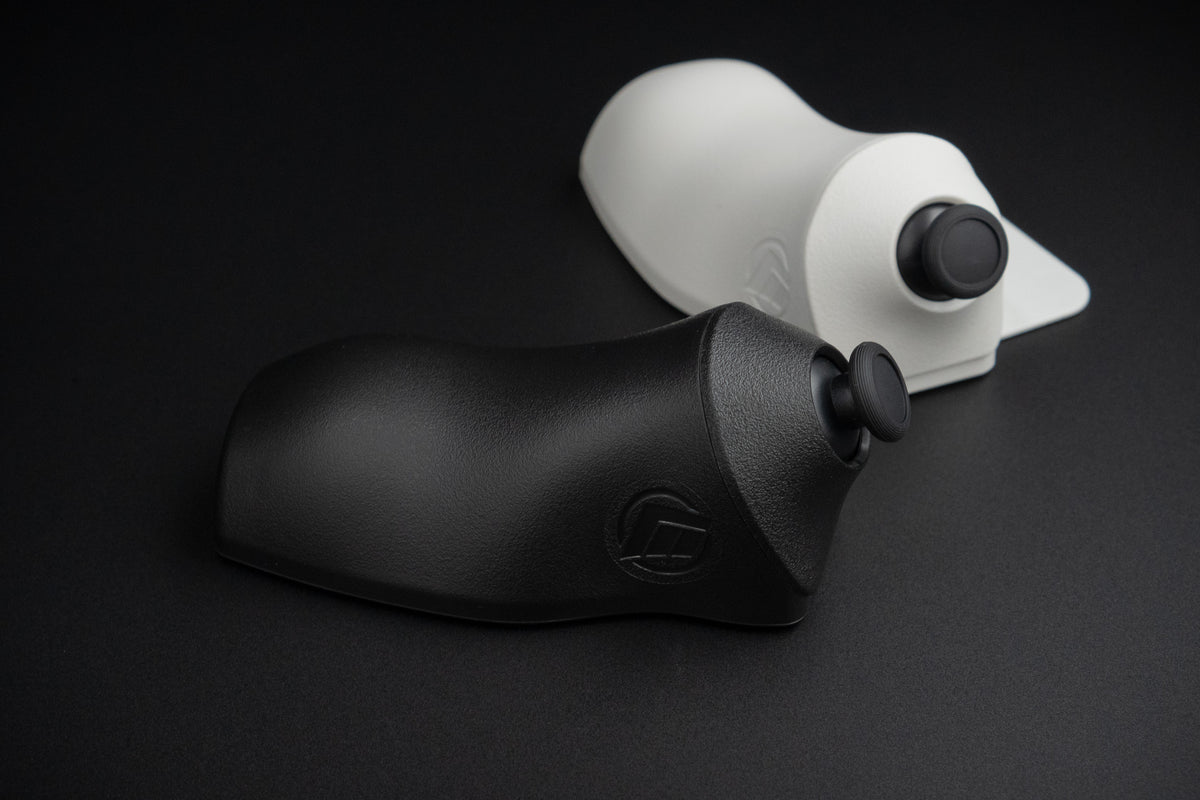
The keyboard joystick that puts movement on your thumb
The MaxxStick Ergo Pro sits under your keyboard so your thumb handles movement, leaving every finger free for the builds, edits and swaps that win fights.
- Move with your thumb, full 360 degree analog
- Keep your fingers free for keybinds
- Aim with your mouse, exactly as you do now
- Plugs into USB and works, no software to install
Free shipping to the United States. International shipping is calculated at checkout.
Checkout with confidence
- Secure, encrypted checkout
- Takes about two minutes
- Orders ship within 5 business days
Product details
- Hall Effect joystick module
- USB 2.0, polling rate adjustable from 125 Hz to 1000 Hz
- Input modes: XInput, Keyboard and DirectInput
- Injection molded shell
- Available in black or white
- Windows PC. Limited Xbox Series X and S support in Keyboard Mode. Not compatible with PS4 or PS5.
Product highlights
- Angled design sits the joystick close to the keyboard, so your hand travels less
- Reach a full extra row of keys without stretching
- Hall Effect sensors, built to avoid stick drift
- Configure everything in the browser with Maxx Utility. Nothing to download.
- Free firmware updates over time
How does the MaxxStick work?
It mounts under the front edge of your keyboard and reports to Windows as a standard game controller. Your thumb drives movement while your keyboard and mouse keep doing everything they already do. Maxx Utility, our browser tool, switches it between XInput, Keyboard and DirectInput so it matches whatever the game expects.
What's in the box
- MaxxStick Ergo Pro keyboard joystick
- 6 ft USB-A to USB-C braided cable
- Rubber pad
Black units ship with a red cable. White units ship with a black cable.
The problem
Untangle actions from movement.
You switched to PC because precise mouse aim is a game changer. But your other hand has been struggling. The same fingers you need to make plays, the builds, edits and swaps, are also how you move your player.
With your fingers fumbling with WASD, executing great plays can feel a struggle.
This is what the MaxxStick was built for.
Buy nowOne thumb changes the whole hand.
It is an add-on, not a replacement. Your keyboard and mouse stay exactly where they are, and your thumb takes over movement.
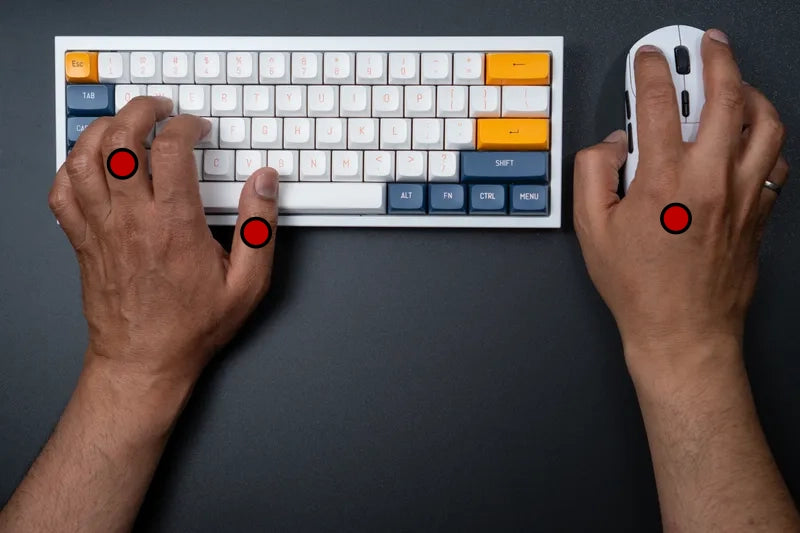
Before MaxxStick
- Left fingers
- Movement + abilities, mechanics, keybinds
- Left thumb
- Jump
- Right hand
- Aim and shoot
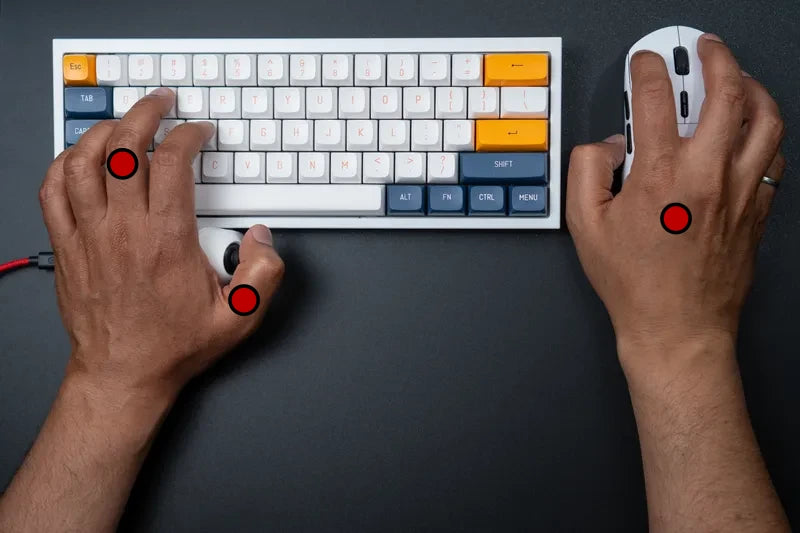
After MaxxStick
- Left fingers
- Abilities, mechanics, jump, keybinds
- Left thumb
- Uninterrupted movement
- Right hand
- Aim and shoot
Trusted by creators







How it works
3 steps to free fingers.
The MaxxStick doesn't give you better movement. It gives your fingers less to do. Put movement on your thumb and each finger has one job. Expect two to three weeks of adjustment while years of WASD muscle memory moves across.
Set your input mode
Open Maxx Utility in your browser and set the MaxxStick to the right input mode for your game. Nothing to install.
Dial in your keybinds
Rework your keybinds to take advantage of the fingers you just freed up.
Make plays
Start making moves that leave your opponents wondering how you do it.
13 reasons from real players.
Unedited, from Discord, YouTube and the shop.
I've tested pretty much every movement setup, and this joystick is on another level. The biggest difference is convenience and efficiency. Instead of using three fingers on WASD, you get full 360° movement with a single thumb. That immediately frees up extra fingers for binds, which means faster edits, faster builds, and cleaner mechanics overall.
People always think my hand cam is fake because they are used to seeing finger gymnastics. The maxx stick makes everything optimal and efficient so it looks like a lot is going on because it is. The hand cam stays calm because I'm moving with a single finger instead of 3 that also share other binds.
This is the real deal. Never been a fan of WSAD. Was on the fence about an Azeron for a long time but couldn't justify the price or the quality of 3D prints. Maxxstick just works. The configuration tool is excellent, stick quality feels great, and it feels like 2nd nature for someone like me used to controllers.
I just bought one, recommended through reddit. Was looking at the razer tartarus v2 but didn't like the joystick being restricted to 4 directions. Decided this was pretty much the same but with 360° movement and I can keep my keyboard instead of using the razer tartarus keypad.
I have got a Max stick for 1.5 years now and it works great. I use it for Fortnite and it is so great. It allows you to have 4 free fingers for other keys instead of just going front, backwards, left, and right. Great job and keep on improving!
Got the Ergo Pro and had the S3 before. Feels like I can reach a row further. Good product 👌
Just got my ergo pro and I love the feel of it, coming from the regular ergo. It feels much better on my hand. 10/10 highly recommend 💯
Bought the original Maxxstick ergo like 1 week before this one was announced lol. But I actually love the thing, it's so much better than WASD or even gamepads like Azeron.
Been using your joysticks for years. And I have to say they are amazing. To this day I still use the Maxxstick LE that I won in your giveaway!
Thank you for developing this product and continuing to innovate. I have the older one that sticks out at a 45. It's fantastic and has never let me down.
I got 3 of them sticks! I even stream using it 😎 love the MAXXSTICKS
I have many devices that are similar and this one is my favorite. Thank you for this guide. Keep up the great work.
Just got mine today and set my keybinds for arc raiders. Will be using it all day. I like it better than WASD and it frees up keybinds so I should be slightly better.
How it stacks up.
There is more than one way to change how you move. Here is where the Ergo Pro sits.
| MaxxStick Ergo Pro | Analog keyboard | Gaming keypad | Controller | |
|---|---|---|---|---|
| Full 360° analog movement | Yes | No, 8 directions | Varies | Yes |
| Hall Effect sensors | Yes | Varies | Varies | Varies |
| Mouse aim | Yes | Yes | Yes | No |
| Keep your own keyboard | Yes | Replaces it | Sits beside it | Replaces it |
| Software required | None | Usually | Usually | Varies |
| Frees your fingers for keybinds | Yes | No | Partly | No |
Will it work with my game?
If a game supports a controller or WASD, it supports the MaxxStick. These are the titles players ask about most.
Fortnite
The build and edit game the MaxxStick was made for. Movement on the thumb, every finger free for binds.
Marvel Rivals
Hero abilities eat keybinds fast. Freeing three fingers gives you somewhere to put them.
Battlefield 6
Analog movement means real walk to sprint control instead of a shift key.
Ready or Not
Slow, deliberate movement is the whole game. A thumbstick gives you the speed range to do it.
Halo: Campaign Evolved
Controller native movement with mouse aim on top.
Minecraft
Runs in keyboard mode, so it slots into a game most people already have installed.
Deadlock
Six abilities, items and movement on one hand. This is where free fingers pay off.
of PC games work with the Ergo Pro, across XInput, Keyboard and DirectInput modes.
Try it without the risk.
What you get, and what happens if it isn't for you.
Returns
If the Ergo Pro isn't for you, you can send it back. Terms differ by region, so check the return policy for your country.
Free US shipping
Free to the United States. We ship to 38 other countries with rates calculated at checkout, and duties or taxes may apply on arrival.
Ships in 5 business days
Orders are processed within five business days, then tracked door to door.
Hall Effect sensors
True magnetic sensing rather than potentiometers. That is what keeps the centre honest over time.
No drivers, no software
Plug it into USB and it works. Maxx Utility runs in your browser when you want to change modes.
Keep your keyboard
The Ergo Pro mounts underneath the board you already use. Nothing gets replaced.
Everything you need to know.
New to keyboard joysticks? These are the questions players ask most before they switch.
What is the MaxxStick Ergo Pro?
It's a keyboard joystick, a small analog thumbstick that mounts under the front edge of your keyboard. Your left thumb rests on it and handles movement, while your fingers stay up on the keys for everything else. It's an add-on, not a replacement: your keyboard and mouse don't change.
Why use a keyboard joystick instead of WASD?
WASD gives you eight directions and occupies three fingers. A thumbstick gives you full 360 degree movement with variable speed, using one thumb. The movement itself is better, but the bigger win is what it frees up. Three fingers that were doing double duty become available for binds, which is where most of the gain comes from once you have reworked your layout.
Do I need to install any software?
No. The Ergo Pro is plug and play over USB. No drivers, no background app, no account. If you want to change input modes, remap or adjust sensitivity, Maxx Utility runs in your browser and there is nothing to install.
How is this different from an analog keyboard?
An analog keyboard replaces your keyboard and reads how far you press each key. The Ergo Pro keeps your keyboard and adds a real thumbstick underneath it. You get genuine analog movement on your thumb rather than four analog keys still occupying three fingers.
Is there a learning curve?
Yes, and we would rather be straight with you about it. Expect one to three weeks before it feels natural, because you are moving years of WASD muscle memory onto your thumb. Players coming from a controller usually adapt faster, since the motion is already familiar.
Will it work with my keyboard?
It mounts under the front edge of a standard keyboard and works with the great majority of them, full size through 60 percent. Very low profile boards and keyboards in a fitted case are the usual exceptions.
Does it work with Fortnite?
Yes. Fortnite is the most common game among MaxxStick players. In Fortnite settings, turn off Ignore gamepad input and turn on Lock input method as mouse. Movement is then read as analog input while your mouse continues to handle aim.
What PC games are compatible?
If a game supports a controller or WASD, it supports the MaxxStick. Between XInput, Keyboard and DirectInput modes there is an option that fits up to 95 percent of PC titles.
Can I get banned for using it?
The MaxxStick is a standard USB input device. It doesn't inject inputs, automate anything or modify a game. It is hardware you move with your thumb, no different in principle from a controller or a mouse. Competitive rules are set by the organisers, so check the ruleset for any tournament you enter.
Does it work on Xbox or PlayStation?
The Ergo Pro is built for Windows PC. On Xbox Series X and S it works in Keyboard Mode only, in games that accept two keyboards, and it is not recognised as a full controller. It does not work on PS4 or PS5, because Sony restricts which input devices are accepted.
I'm switching from controller to keyboard and mouse. Will this help?
This is exactly the case it was designed for. The hardest part of the switch is usually movement: mouse aim is the reason you are switching, but WASD feels blunt after a thumbstick. The Ergo Pro lets you keep the movement you already know and add the aim you came for.
Free your fingers.
Your fingers have been stuck on WASD long enough. Give movement to your thumb, keep your mouse aim, and find out what your hand can do when it is free.
Free shipping to the United States. International shipping is calculated at checkout.